Ableton Live Collaboration (Stem Handoff)
On this page
- The model
- Multiple songs
- The Music page and stem branches
- Keep song ids stable
- Create the repository
- First setup (mix owner)
- The collaborator loop
- The mix owner loop
- Merge approved stem MRs
- The validator
- The Collect All and Save trap
- Ableton analysis files (.asd)
- External collaborators
- Other DAWs
- What not to do
- Troubleshooting
Ableton Live has one writer per Set. Two people cannot edit the same Set at once, so the usual workaround is exporting stems to a shared folder and reconciling versions by hand. Swarmfile does not pretend Live can be multi-user. It makes the stem handoff real: one shared repository, one folder per role, branches and merge requests for each handoff, a validator that catches a wrong sample rate before the mix owner opens the file, and a session lease so the Set has one owner while Live is running.
This is parallel production, not real-time co-editing. It is the workflow most production teams already use with a shared folder - with versioning, per-folder access, and no full downloads.
The model#
- One Set owner (the mix owner). Only they write
Songs/song-one/song-one.als. - Stem owners. Each collaborator owns
Songs/song-one/Stems/ROLE/and never edits the Set. - Stems are the merge surface. The Set is not merged. A collaborator branches from
main, overwrites their stem, and opens a merge request. The changed paths are disjoint, so the request merges cleanly. The hub scopes astem/song-one/<role>merge request toSongs/song-one/Stems/<role>/: a request that also carries the Set, another role's stem or any other path is refused rather than partially merged. The mix owner reopens the Set and hears the new stem from the same fixed path. - The Set is a single-writer document. Branch it to try an arrangement, but hand the whole Set back; never merge two Sets.
Multiple songs#
A repository can hold several songs. Each is a folder under Songs/ with its own stems.json, project file and Stems/ tree; the template starts with Songs/song-one/. Rename the starter song-one folder to a meaningful song id, copy it to Songs/<song>/ and update its manifest, or use Add another song on the Desktop App's Music page; a folder name is 1-32 characters, starting with a letter or digit; then lowercase letters, digits, _ or -.
The Music page and stem branches#
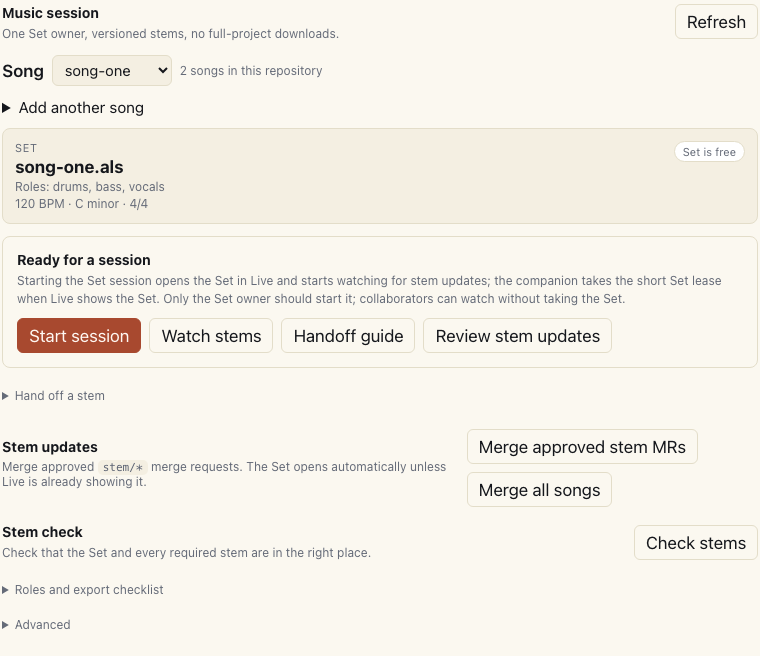
The Music page lists the songs and works on the selected one: the song selector swaps the Set, roles, handoff, merge action and session state. A song's stem branch is stem/<song>/<role> and the hub scopes its merge request to Songs/<song>/Stems/<role>/.
Each role's path in stems.json must stay under Stems/<role>/; a repository with a custom role path should move the file into that folder and update the manifest before validating.
Keep song ids stable#
Give each song's Set a unique filename: the companion matches Live's window title, which carries only the file name. Do not rename or move a song folder while a stem handoff is open - the folder name is the song id, so old stem/<old>/<role> branches and MRs keep pointing at the old path; merge or close them first. Existing single-song repositories with a Song/ folder keep working with stem/<role> branches.
Create the repository#
Create one from the Music production (Ableton Live) template in the web app, the Desktop App's New repository dialog, or:
swarmfile repository create "Song" --option template=music
The template seeds:
Songs/song-one/- Live's project folder, withSongs/song-one/Samples/andSongs/song-one/Stems/ROLE/.Songs/song-one/stems.json- the handoff contract (Set path, tempo, format, roles).tools/stem-check.mjs- the validator.tools/ableton-companion.mjs- the Node fallback Set lease and stem watcher (the native command isswarmfile stems companion --manifest Songs/song-one/stems.json).Exports/,Docs/, and a.swarmfile/ci.ymlMR check.
The examples below use the starter song song-one; substitute a song's folder name for another song.
It also enables protected ACLs and keeps every saved version. Your plan must include folder ACLs to use the template. On a self-hosted community server the key model is owner/member; the Set-owner convention is a team rule there rather than a per-folder ACL.
First setup (mix owner)#
- Save the Set as
Songs/song-one/song-one.als. Use Save or Save As without collecting; see the Collect All and Save trap. - Add one audio track per role and a clip that references the fixed path
Stems/ROLE/ROLE.wav, relative to the song folder. Keep the filenames and the export format fixed.swarmfile stems setup --manifest Songs/song-one/stems.jsonprints the exact track/clip checklist (it never edits the Set);--add-role ROLE --writeadds a role and its folder. - Edit
Songs/song-one/stems.jsonfor the roles, tempo and format you use. - Grant access. Give each collaborator write on their
Songs/song-one/Stems/ROLEfolder and read on the project root; keep write onSongs/song-one/song-one.alsandExports/for the mix owner. See Permissions. - Run the strict validator:
swarmfile stems check --strict --manifest Songs/song-one/stems.json
The collaborator loop#
Branch from the song's base branch (usually main), open a mount on that branch, and open the Set from the branch mount so your new stem plays in context:
tools/handoff.sh drums main song-one
# Windows: tools\handoff.ps1 -Role drums -Song song-one -Base main -MountPoint S:
In the Desktop App, Music → Hand off a stem does the same: choose the role, create the handoff mount, export to the fixed path, then Commit + create MR. Grant access opens the role folder ACL and Open folder reveals the path. The equivalent manual commands are:
swarmfile branch create stem/song-one/drums --from main
swarmfile mounts open ~/Swarmfile-handoff-song-one-drums --label song-one-drums --branch stem/song-one/drums --set-current --wait
On Windows, pass a drive letter instead of a folder path. See Multiple Mounts. These examples assume main; if the repository's default branch has another name, use it here and in the CI branches filter. A song's branch is stem/<song>/<role>; a one-segment stem/<role> is only for a single-song repository using the root Song/ layout.
Then:
- Overwrite only
Songs/song-one/Stems/ROLE/ROLE.wav- do not editSongs/song-one/song-one.als. - Save and commit. The drive auto-commits after an idle window; run
swarmfile committo close the batch now. - Validate and open the handoff:
cd ~/Swarmfile-handoff-song-one-drums
swarmfile stems check --strict --manifest Songs/song-one/stems.json
swarmfile commit -m "drums stem"
swarmfile mr create --title "Drums v3" --from stem/song-one/drums
Use Songs/song-one/Stems/ROLE/alt/ for alternate takes; keep the canonical file as the one the Set references.
The mix owner loop#
From the Desktop App, open Music in the activity bar and click Start session. That starts the companion and opens the Set in Live; the companion takes the lease when Live is showing the Set, and the page shows the holder, Live detection and stem-update notices. Use Watch stems instead when you are a stem collaborator. The commands below are the equivalent for scripts and older checkouts.
Run the companion from the mounted repository root before opening Live:
swarmfile stems companion --manifest Songs/song-one/stems.json
The seeded tools/ableton-companion.mjs is the Node fallback for older checkouts; the native command compares each stem entry's current content CID (rootCid; local/committed, not a timestamp) and needs no Node.
While Live is running, the companion takes a short session lease on Songs/song-one/song-one.als with swarmfile lease and renews it. The lease is a reference on the ordinary standard lock: the engine heartbeats it, so another machine's write is refused and it sees who holds it. The default lease is 2 minutes and the companion renews at half; when Live stops, the companion drops its lease. If Live still has the Set open, close it to free the hub lock (Ctrl+C drops the companion lease too). If someone else holds the Set, the companion names them and prints:
swarmfile unlock-request create Songs/song-one/song-one.als
The companion also watches the stem files and reports when one changes, so you know when to reopen the Set to hear it. Stem collaborators run the same command with --watch-only to get that notification without holding the Set; in the Desktop App that is Music → Watch stems.
If your Live install reports a different process name, set SWARMFILE_ABLETON_LIVE=1 while Live is open (or 0 while it is closed) to override detection. Pass --title-match song-one.als to lease only while Live's front window shows that Set (macOS may ask for Accessibility permission; Windows uses the main window title). macOS asks for notification permission on first use and Windows toasts are best-effort when the CLI companion is run with notifications enabled. The Desktop App Music page shows these notices in-app and also allows the companion’s desktop notifications.
If the companion is killed rather than stopped, its session lease is reaped in about two minutes; Finish session in the Desktop App drops it immediately. A manual swarmfile lease Songs/song-one/song-one.als --release --token TOKEN needs the companion's token; a tokenless release cannot drop another process's lease. The hub lock remains while Live (or another mount) still holds the Set open.
After a stem merge request lands, reopen the Set. If you keep the Set and the stems at their fixed paths, the new audio plays from the same clip - no Set edit is needed.
Merge approved stem MRs#
From the Desktop App's Music page, Stem updates → Merge approved stem MRs merges the approved stem/* requests that target the branch you have open and whose diff stays inside its role folder; Merge all songs runs the same action across every song.
An owner/admin can enable Merge settings → Merge approved stem MRs automatically; it merges only stem requests whose target is the repository's default branch, leaves the request open on any conflict or failed gate, and emails/notifies the owner when a refused automatic merge needs attention.
Anything that still needs a reviewer, a conflict resolution or a fresh approval is reported and skipped, and the action never touches the Set. When the merge succeeds, the page opens the Set unless Live is already showing it; use Reopen Set if the merge came from elsewhere or Live was already open.
The validator#
swarmfile stems check checks:
- the Set exists and the manifest's roles are present;
- every present WAV's sample rate, channels and bit depth match
Songs/song-one/stems.json; - stems are aligned in duration (or match an explicit
durationSeconds); - the Set references the fixed stem paths;
- the Set does not carry absolute media paths;
- the Set has not been rewired to a collected copy under
Songs/song-one/Samples/.
Use --strict for the handoff gate: missing required stems, missing Set references, absolute paths, collected stems and duration mismatches fail. --json gives scripts a machine-readable result. --max-set-mb N raises the Set scan cap for a very large arrangement. --quality adds sample peak and clipped-sample counts for PCM/float stems; integrated LUFS and oversampled true peak remain a separate metering step.
The seeded .swarmfile/ci.yml runs the strict Node validator on merge requests that touch a song folder once an owner enables Hosted CI; tools/stem-check-all.mjs checks every song. An MR run executes on the source branch (stem/*), so the owner must allow automatic runs on unprotected branches even when main itself is protected (see Hosted CI).
The Collect All and Save trap#
Collect All and Save copies media referenced from outside the project folder into Songs/song-one/Samples/ and rewires the Set to those copies. Stems inside Songs/song-one/Stems/ are already in the project folder, so they are not collected. The trap is a stem that lives outside the song folder: collecting moves it and the fixed path is no longer what the Set plays.
For the master Set, use Save (or Save As without collecting). Keep Songs/song-one/Samples/ for samples the Set actually uses and Songs/song-one/Stems/ for the handoff bus. The validator flags a Set that references a collected stem copy. If you must collect, do it on a copy of the Set and keep the master on the fixed paths.
Keep paths relative inside the song folder. Live stores files inside the project folder relatively, which keeps the Set portable across machines - including a different Windows drive letter.
Ableton analysis files (.asd)#
Live writes .asd files next to audio with transient/warp analysis. The template ignores *.asd so machine-specific analysis does not collide; Live regenerates it on first play. A rendered stem's .asd is disposable - the Set's warp markers live in the Set, not the stem.
A shared sample with hand-edited warp markers is the exception: its .asd is not synced. Keep that sample in Songs/song-one/Samples/ and sync its .asd explicitly (remove the ignore line for that path in a branch), or bake the warp into the rendered stem. Never sync the global cache under ~/Library/Application Support/Ableton. See Docs/analysis-files.md in the repository.
External collaborators#
Public repository: the guest requests access on the repository. The self-serve request targets Contributions/ (not a chosen folder) and grants comment_upload - upload and comment, not a branch write or a lease. The guest uploads the stem there; the mix owner moves it into Stems/<role>/ (or adds a role and wires it in the Set) and commits. A guest cannot create a subfolder, overwrite a canonical stem, or hold the Set lease. The access request records the approval; the flow does not record a separate sharing-rights assertion.
Private repository: a guest read/comment grant cannot upload. Invite a recurring mixer as a member with write on their role folder (a seat), or use an upload-only drop the owner creates. The seeded Songs/song-one/Stems/incoming/ folder is for that member/owner drop, not a self-serve public request target. See Permissions.
Other DAWs#
Create the Music production (DAW-agnostic) template for Pro Tools, Cubase, Studio One or Reaper (file-based projects). Save the project as Songs/song-one/Session.<ext> and set set in Songs/song-one/stems.json to that filename. The manifest's setFormat: "opaque" tells the validator not to parse the project; it still checks the project exists and every stem, so keep the fixed Stems/ROLE/ROLE.wav paths in the DAW's own bin or playlist. The validator, handoff script and stem model are identical.
A Logic .logicx is a package directory: the validator accepts it, but the standard session lease on the bundle does not gate its child files. Use a Pack & Go checkout for the Logic bundle - the Music page's Start Pack & Go starts it; the generic Start project session can hold the project lease but is not a substitute for the bundle checkout.
The live Set companion is Ableton-specific. For a file-based DAW, the Desktop App starts a generic project session. A manual swarmfile lease Songs/song-one/Session.<ext> returns a sessionToken; pass --token when renewing and releasing, or adapt the companion's process probe.
What not to do#
- Do not edit or merge
Songs/song-one/song-one.alson a collaborator branch. Branch the Set only to try an arrangement, then hand the whole Set back. - Do not rename a stem file without updating the Set and the manifest. The fixed path is what removes the Set edit from every handoff.
- Do not change sample rate or bit depth mid-song. Update
Songs/song-one/stems.jsonand re-export deliberately. - Do not use a guest upload grant for a canonical stem. A guest
comment_uploadgrant is upload-only and lands inContributions/; the owner moves it, or use a member seat for a recurring collaborator.
Troubleshooting#
- Live cannot save the Set / the companion says it is held. Another person holds the Set.
swarmfile locksshows the holder; the holder can drop their companion lease from the Desktop App (or with its--token), and the Set is free once they close Live; or ask withswarmfile unlock-request create Songs/song-one/song-one.als. - A new stem is not heard. Reopen the Set; check that the Set references
Stems/ROLE/ROLE.wav(not a collectedSamples/copy); run the validator.swarmfile stems status --manifest Songs/song-one/stems.jsonshows the Set and each role's engine sync state and currentrootCidif you need to confirm a stem actually synced. - The companion cannot take the lease. If you are a stem collaborator, run it with
--watch-only; only the Set owner holds the lease. Runswarmfile lease Songs/song-one/song-one.alsdirectly to see the hub's refusal; the session lease does not use the Pack & Go policy. stems checkreports a missing required role. Export the stem to the manifest path, or mark the role"required": falseif the song does not use it.- The validator reports an absolute media path. Move the sample inside the song folder and relink it in Live.
Something wrong or missing? Report a docs issue.