Version control for files Git can’t hold.
Branch, review, and roll back multi-terabyte projects on a drive your team already knows - a full version-control system you mount, not a sync folder with history. Editors keep saving normally; the controls are there when leads and pipeline teams need them.
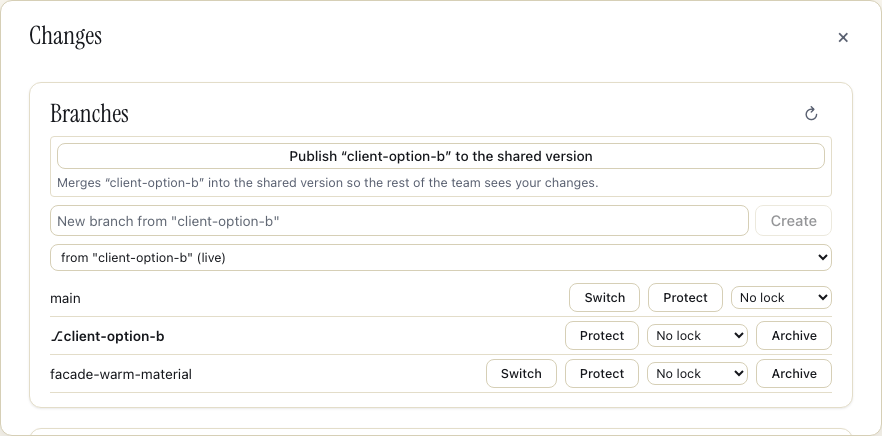
A branch is a click, not another copy of the project.
Switch versions, inspect every commit, and resolve a binary conflict from the dashboard your team already uses.
Git stops at the binaries. Perforce adds a workflow tax.
Git chokes on big binaries
A 4 TB project isn’t a git repo. Diffs are meaningless, LFS is a bolt-on, and merging a .rvt or a .drp is a non-starter.
Perforce works, at a cost
The checkout dance, the admin overhead, the depot mental model. It solves the storage problem by adding another system for the whole studio to operate and learn.
Swarmfile gives you the version control, and takes away the version-control tax.
Three steps, no depot to administer.
Branch
Fork a project and each mount diverges independently over the same shared blocks. Try a new grade, cut, or look-dev pass without copying terabytes or touching main.
Commit a changeset
Bundle a set of file changes into one named, atomic, revertable commit. The group lands together, appears in the activity feed, and can be rolled back as one unit. You can also park open changelists when you need to switch branches - set aside on the hub, then resumed from the app’s Parked changes panel or swarmfile changelist resume.
Merge
Land the keeper back onto main with a whole-file merge and conflict detection. Binary conflicts are winner-take-all: Swarmfile flags them and you choose which version wins. No silent overwrite.
Review it before it ships.
Protect main so changes into it need an approved merge request, with required-approval counts and protection rules that can auto-request CODEOWNERS-style reviewers. Reviewers see which files changed, comment and @-mention teammates, then approve or request changes. Self-approval is blocked, and the same review gate can stop an unapproved render or build in CI. When someone leaves, the revocation reaches every machine: cached copies of revoked files are deleted and the org sees a purge receipt per device.
Prefer the terminal? It’s all there.
Branch, commit, merge, tag, review, restore, and inspect history from the swarmfile CLI. Script the same controls into a render or build pipeline without opening the dashboard.
History you can verify. A clone when you want one.
Commit history is hash-chained, and the hub publishes Ed25519-signed checkpoints of it. The standalone swarmfile-verify-history tool recomputes every hash and checks the signatures against keys you pin, with no engine or mount, so a rewritten history can’t pass quietly. There’s no squash or rebase by design - restore and revert land new commits, and amend renames a message only.
Need a plain git checkout? Turn on git view and git clone swarmfile://<org>/<project> works with the remote helper the desktop app installs, and a fast-forward git push sends commits back. Git & Swarmfile →
Keeping your git host for the code? Point its files at Swarmfile: stock git-lfs clients push up to ~5 GiB per object straight to storage, the transfer agent bundled with the desktop app takes it to 256 GiB per object - chunked and resumable - and git lfs lock and the mount share the same server-side lock. Git-LFS on Swarmfile →
Runs itself in CI, too.
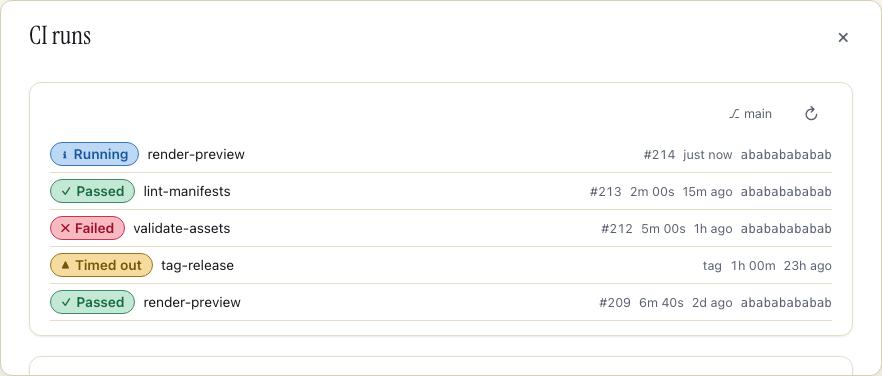
A headless engine watches a branch and runs a job on every matching commit or tag from an in-place checkout - no git clone, and only changed blocks re-fetch after the first run. Prefer runners you don’t operate? Hosted CI runs .swarmfile/ci.yml jobs in per-job containers with live logs, artifacts and a dependency cache, billed per second.
Built first for post. Useful anywhere binaries get big.
VFX & post
Try a grade, cut, or comp variant without copying the project; review it, then merge the keeper back.
Game & real-time
Look-dev variants, level options, and pipeline branches without cloning the project.
Geospatial & civil
Version point clouds, orthomosaics, and design alternatives without duplicating hundreds of gigabytes.
Design & AEC
Explore option A and option B in parallel, then land the chosen one.
Perforce power, drive-letter simplicity.
You get atomic changesets, cheap branches, and controlled merges (the things you’d stand up Perforce for), but they live inside a normal mounted drive. There’s no depot to administer and no separate VCS client to learn: the desktop app you install is the drive. Saving a file doesn’t need a checkout first; locks and check-out are there for the files that need them, like a .uasset or a Revit central model. An --exclusive mount goes further: while one mount holds a file open for writing, a sibling mount’s write-open is refused, so two machines can’t quietly edit the same file. Your artists keep working the way they already do; the version control is there when someone needs it.
Renames and deletes don’t wait on the network, either: they land on the drive the moment you make them, with a Waiting for the hub badge until the change is confirmed.
Deleted work isn’t gone: files and folders wait in Trash, and restoring a folder offers the files that were deleted with it - so an accidental folder delete comes back whole.
Branch it. Commit it. Merge it. Mount it.
Start a 7-day Pro trial and try a branch on a real project. Card on file, nothing charged until day 7. A trial covers up to 2 seats; add more once it converts.
Cancel anytime before day 7.