Open a 200 GB survey without downloading it.
Open a 200 GB tiled survey of cloud-optimized point clouds and orthomosaics (COPC, COG), and pan around it without pulling the whole file. You stream only the tiles you look at, never the whole file. Re-deliver and store only the tiles that changed, roll back to any past version, and pin an exact revision for a deliverable.
Multi-gigabyte data was never built to move.
SSDs in the back of a truck
Crews collect 200 GB of LiDAR in the field, drive it back, and copy it to the NAS. Half a day gone before anyone can process a thing.
The VPN grinds to a halt
One analyst opens a 50 GB orthomosaic over the VPN and the whole office slows down. The fix is usually someone driving an SSD across town.
Storage that scales with revisions
Every re-delivery is another near-duplicate 200 GB folder on the NAS. You pay to store the same ground, over and over.
Swarmfile leaves the data where it is, and streams it to you.
Open a big scan. Pan around it. Wait for nothing.
The whole point of Swarmfile, in three steps.
- Step 1Mount
The whole survey drive appears
Sign in and every project is right there: 234 GB of scans and orthos across the drive, with nothing yet copied to your machine.
- Step 2Open
An 18 GB point cloud opens in seconds
Open the cloud-optimized (COPC) point cloud in QGIS. No copy step, no progress bar. The viewer asks only for the parts it's drawing, so it's ready in seconds. A plain .las still streams, but most tools read it end to end; convert once to COPC to get this.
- Step 3Pan
Only the tiles you look at stream in
Pan and zoom, and Swarmfile fetches just the tiles in your view. The rest of the file never leaves the cloud, so your disk stays nearly empty all day.
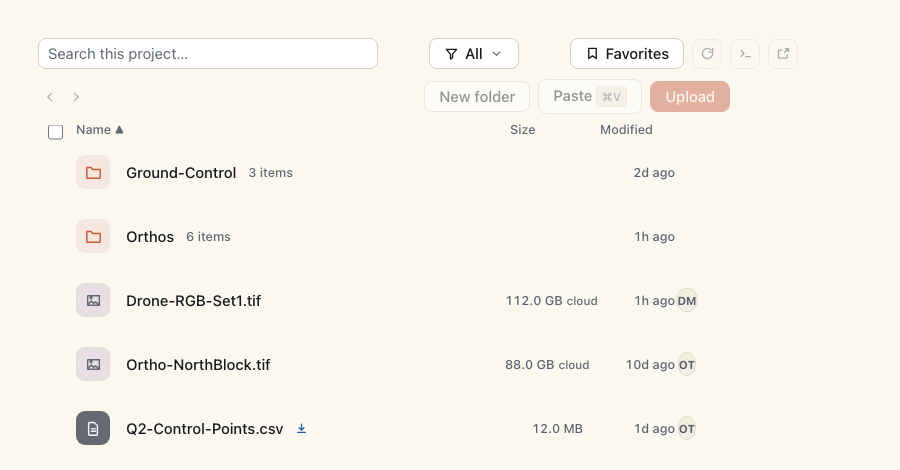
Built for how survey teams actually work.
Prove where the data lives
Pin an organization to the EU or the US at signup (infrastructure-enforced, not a policy promise), so a government or utility data-sovereignty requirement on your imagery and survey data has a real answer. Included on every paid plan from Starter up, not gated behind an Enterprise contract.
Store only what changed
Re-deliver a tiled dataset and you don't pay to store another full 200 GB. FastCDC splits files into content-defined blocks, so unchanged data is stored once and a re-export costs only the blocks that actually changed - even inside a file that did.
Work in the field, sync at the truck
Pin the survey area and capture all day with no signal. A self-hosted seed node on a rugged field NAS (Pro and up) quietly carries it back: in range, edits upload and the office sees the new tiles. Two people touched the same file? You pick the winner, no silent overwrites.
One download per office
A site trailer or regional office doesn't pull the point cloud once per workstation: the first machine to open it serves the rest over the local network, so the whole crew costs a single cloud fetch - and each machine that opens it becomes a source for the next, so reads scale with the crew rather than the site's uplink.
Nothing to run at the site
No server, VPN or appliance has to exist on the rig, in the truck or at the office: laptops mount the same project, the first machine to open a dataset seeds the rest over the LAN, and the cloud copy is the backstop. Less kit to power, sync and replace.
Share across firms and clients
Give a sub or a client folder-level access to one survey: read or comment, revoke in a click (cached copies on their machine are purged, with a receipt for the org), no extra tenancy (Starter and up; 1 guest per seat on Starter, 5 on Pro, unbounded on Enterprise). SCIM and LDAP (Pro) keep team access current.
Versioned history
Every change is timestamped with one-click rollback. "Who replaced the ortho?" becomes a one-line answer - and the hash-chained, hub-signed history can be re-checked offline with swarmfile-verify-history.
Try an alternate classification, keep the master safe
Branch the dataset to test a new point-cloud classification or processing pipeline without touching the shared tiles. Merge it back into main once it checks out.
Preview the point cloud before you load it
LAS/LAZ point clouds get an automatic preview, so you see the shape of the scan before you open the full dataset in your desktop tool - today within the preview source limits; larger scans stay on the desktop tool.
Encrypted, per project
On paid plans, files saved through the drive are encrypted with your project's own key before they leave your machine. Working with sensitive survey data? An opt-in end-to-end tier (Pro and above) keeps your keys off our servers. Free and public projects are stored unencrypted, and direct git-LFS uploads skip app-layer encryption (details).
Stop driving drives back to the office.
Trial Swarmfile on one survey with a 7-day Pro trial. Card on file, nothing charged until day 7. A trial covers up to 2 seats; add more once it converts. Bring your own NAS or use ours; we'll help with the migration.
Cancel anytime before day 7.