For VFX, post, color and audio

Mount the project. Start cutting.

Open a 4 TB Resolve or Premiere project in seconds, in the studio, at home, or across two continents. Nothing downloads; you stream only what you scrub, and you can open a cut while a teammate is still uploading it. Branch a look-dev, roll back a bad grade: version control your editors never have to think about.

No full-file downloadsNo syncingNo drives in the mail
Sound familiar?

Right now, every way you move a project is a workaround.

01

Hard drives in the mail

A 4 TB project ships by courier from LA to Vancouver. Two days gone, and the editor's already working from a stale copy.

02

Nightly sync that breaks

Resilio or Syncthing chews bandwidth all night, then breaks silently when a workstation reboots. Someone has to babysit it.

03

Every editor pays the cloud

Five editors in one room each pull the same multi-GB proxies from the cloud. Five copies, five waits, five times the bill.

Swarmfile replaces all three with one drive.

The demo path

From zero to a multi-site cut

The full path a post house walks in one afternoon, the same one we run in every demo call.

  1. Step 1
    Install

    Mount the drive

    Run the signed Swarmfile.pkg from the dashboard. It installs the app and the streaming engine together, both starting at login. Sign in once and your project appears as a normal local drive.

  2. Step 2
    Open

    Resolve opens the project

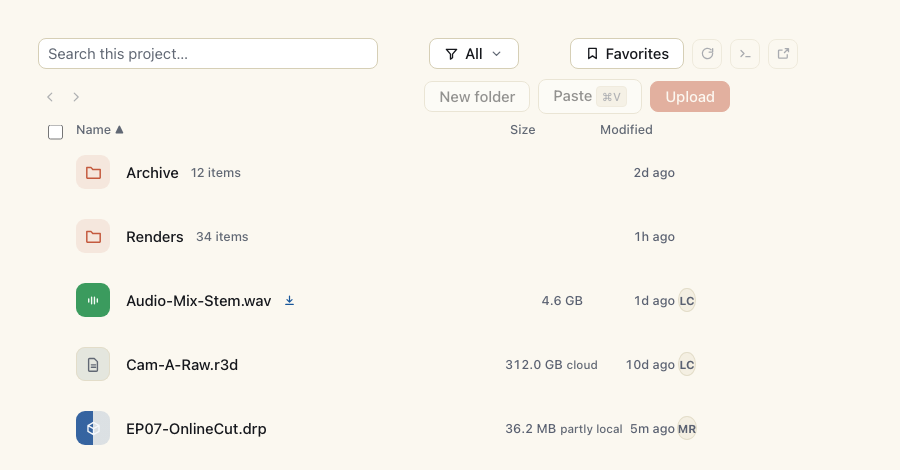
    EP07-OnlineCut is a 4.1 TB Resolve project: the .drp plus camera files, renders and archive. It appears in the drive the moment you sign in, and Resolve opens it without downloading the media first; only the bytes it actually reads land on disk.

  3. Step 3
    Cut

    Scrub the timeline, stream the bytes

    Scrubbing pulls only the proxy ranges you land on, from a colleague's machine on the LAN when they already have them. The parts you don't watch stay in the cloud. 4.1 TB project, 168 MB on disk after a full session.

  4. Step 4
    Collaborate

    Your colorist joins from home

    LISA opens the same project on her home iMac. Her first read (96 MB of headers and timeline preview) comes peer-to-peer from P-DESK in the LA office, over the internet, before falling back to the cloud. Back in the office, everyone else reads over the LAN.

Where it pays off

Three places Swarmfile pays for itself

The three conversations we have on every demo call. If one of these is yours, Swarmfile pays for itself.

Color grading on a cut that's still moving

DaVinci Resolve · Baselight
Today

Colorists pull the entire 4 TB Resolve project from a NAS or shipped drive just to grade 30 minutes of selects. If the cut is still in progress, they wait for the lock (sometimes a week), then re-grade the whole reel when the cut shifts.

With Swarmfile

Mount the project and grade as the cut evolves. The colorist only pulls the rendered preview cache plus the proxy range they're working on. Original camera files stay in the cloud. When the editor changes a cut, the colorist sees the diff in seconds and re-pulls only the affected shots, not the whole 4 TB.

A fraction of the bytes per grade pass.

VFX review without the file drop

Nuke · Houdini · After Effects
Today

Vendors receive the latest cut as a 200 GB file drop every few days. They pull it down, watch their shots, render, upload, repeat. Five days of waiting per round, and a vendor who can't see the latest cut until the producer ships it.

With Swarmfile

Vendors see only their assigned shots. The vendor's machine pulls just the camera files they need, plus a low-res proxy for context. Renders go straight back to the project's Renders/ folder, and the editor sees them in the next refresh, no re-sync, no 'did you upload yet?'.

No 200 GB file drop to download.

Multicam and multi-site, no shuttle drives

Premiere · Avid · Resolve
Today

A reality show shoots in LA, gets cut in NYC, gets color in Vancouver, gets audio mix in London. Four sites, one project. Today: shuttle drives between coasts, NAS replication that drifts, or a LucidLink subscription that costs as much as the editor using it.

With Swarmfile

One drive on every workstation; the first person at each site warms it, everyone after is on the LAN. Editors scrub while offline; changes sync when they reconnect. Cloud is the cold backstop, never the front door.

One drive letter, every site.
Everything else you get

Included with your plan

01

Open a cut before it finishes uploading

Don't wait for the render to land. Start scrubbing a render while a teammate is still uploading it. The bytes stream to you as they arrive, so a review or a color pass can begin the moment work does, not after the transfer ends.

02

Encrypted, versioned, audited

On paid plans, files saved through the drive are encrypted with your project's own key. Every change versioned with one-click rollback, and a full audit trail of who touched what. Pre-release content? An opt-in end-to-end tier (Pro and above) keeps your keys off our servers too, and content can be pinned to the EU or US at creation, on every paid plan. Free and public projects are stored unencrypted, and direct git-LFS uploads skip app-layer encryption (details).

03

Try a look-dev variant, keep the timeline safe

Branch the project to test a new grade or comp without touching what everyone else is cutting. Like the result? Merge it back into main, or open a Merge Request and get a supervisor's sign-off first, so nothing gets silently overwritten. Pipeline TD? There's a CLI for all of it.

04

Name a cut, revert the whole thing

Group every file that changed for a pickup or a client note into one named, atomic commit. See it in the Commits tab, and revert the whole batch if the note gets walked back.

05

See who's cutting what, live

A live roster shows who has each file open the moment they open it, so the assistant doesn't reach for the timeline the colorist already has locked.

06

Scrub a proxy before you pull the master

Video files get a poster frame automatically, and sources up to 16 MiB get a scrubbable H.264 proxy, so you can preview a cut before you commit to streaming the full-res master.

07

Watch dailies while they're still landing

Open a file the moment upload starts, not once it finishes. It reports its real, final size right away and reads catch up to the upload instead of waiting on it. A 40 GB dailies reel is watchable before it's fully in.

08

Cut on a plane

Saves return instantly, online or off. Pin a project before you take off, edit at 35,000 feet, and it syncs the moment you land.

09

Bring your own NAS (Pro)

Already have a NAS? On Pro plans, turn it into a Swarmfile seed. It becomes the warm tier every editor pulls from first: your existing hardware, put to work.

10

A ceiling on the bill.

Owners set a monthly dollar cap on metered overage (storage, collaborators, hosted-CI compute); hit it and growth pauses, while reads keep working.

11

One cloud fetch per office

Every workstation seeds to the others automatically. In a shared office the first editor to open a shot pulls it once from the cloud; everyone else reads it straight from a colleague's machine, so five editors in one room aren't five downloads and five waits. No appliance to buy or babysit.

12

A re-render only pays for what changed

FastCDC chunks files by content, so a new version of a 40 GB reel uploads only the blocks that actually changed, and one-click rollback still restores the whole version. For large files on WAN transfers - or across LAN peers with shard placement on - Reed-Solomon 10+4 spreads content across 14 shards, so a few slow or lost peers can't take a frame with them.

13

Review without a screening room

Threaded comments and @mentions live on the file, with a full activity trail. A client or a sub can be invited to one folder as an external collaborator - read or comment without a paid seat (Starter 1/seat, Pro 5/seat on private projects; free and uncapped on public ones) - which mounts that folder read-only on their machine, enforced by the mount itself, not a UI setting. Link-based, email-verified share links are the no-account alternative, so the weekly review motion doesn't add headcount. Revoking one reaches their machine: cached copies of the revoked files are purged, and the org sees a receipt per device.

14

Give a render node its own key

A headless render node signs in with its own project-scoped key (no artist's login on the farm), forks a branch pinned to a committed tag, and hydrates the whole scope up front so no frame is a network round-trip mid-job. See it in a real recording.

Works with DaVinci Resolve, Premiere Pro, Avid Media Composer, Nuke, Houdini, After Effects, Pro Tools, Logic Pro, Maya, Cinema 4D.
In their words

Post & color teams already in the room

The studios and firms shaping Swarmfile for post, color, and remote audio collaboration.

The first time our colorist opened the cut from her apartment in Berlin, the proxy range she scrubbed landed in under a second. We retired the LA ↔ Berlin shuttle drive the next week.
Media & Entertainment
Head of post-productionIndependent VFX & finishing studio, LA + Berlin22 seats

Quotes shared with our partners’ permission. Names and logos will follow once they’re ready to go public.

Ship the next cut, not the next drive.

Trial Swarmfile on one project with a 7-day Pro trial. Card on file, nothing charged until day 7. A trial covers up to 2 seats; add more once it converts. Bring your own NAS; we'll help you migrate.

Cancel anytime before day 7.