One project file owner
The mix owner is the only writer of the Set or DAW project. Starting the companion session holds the short lease once Live is showing the Set; the workspace itself does not lock on open.
One shared project workspace. One owner of the project file, a folder per stem role, branches and merge requests for every handoff, content-CID checks and a session lease. Open the project from the workspace - no full sync, no Dropbox handoff.
macOS and Windows for Ableton Live · Linux support · Ableton template included · DAW-agnostic variant for file-based projects (Logic bundles use a Pack & Go checkout)
Card on file, nothing charged until day 7. A trial covers up to 2 seats; add more once it converts.
The handoff your team already does with a shared folder - with versioning, per-folder access and no full downloads.
The mix owner is the only writer of the Set or DAW project. Starting the companion session holds the short lease once Live is showing the Set; the workspace itself does not lock on open.
Drums, bass, vocals, keys, guitar, FX - each collaborator owns one folder and overwrites one fixed path.
Stems are the merge surface. The project file is never merged; the owner reopens it and hears the new stem.
A validator checks the manifest, the WAV format and the fixed paths. The native companion watches the stem content CID, not a timestamp; the Node fallback fingerprints the file.
Not real-time co-editing. Stems are still exported to fixed paths; only the download and reconcile step is removed.
A song selector, session controls and one folder per role - the template's home in the app.
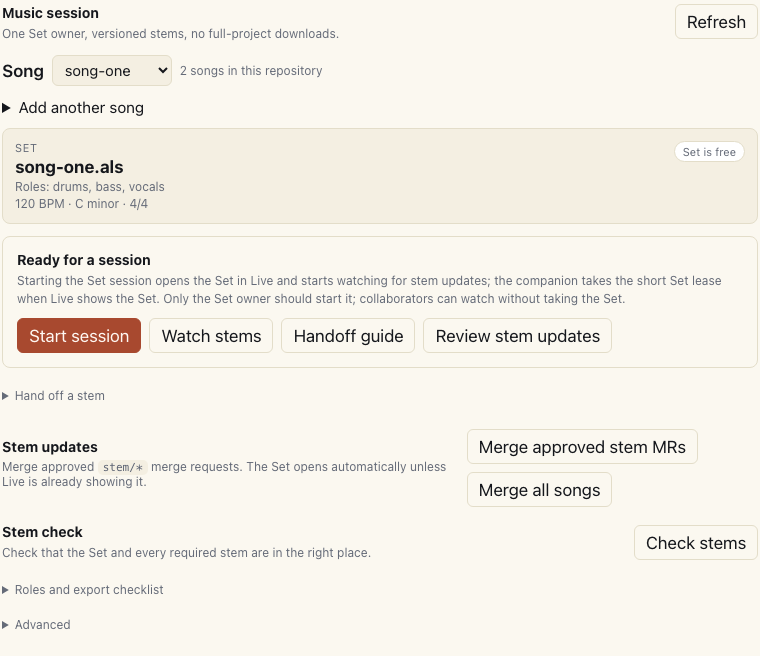
The Music production (Ableton Live) template seeds a multi-song Songs/ layout with a per-song Set, handoff manifest, per-role stem folders, a strict validator, a session companion and one-command handoff scripts. The DAW-agnostic variant does the same layout, validator and handoff for Pro Tools, Cubase, Studio One and other file-based DAWs; the companion is Ableton-specific.
Folder grants require a plan with ACLs; on a community server the Set-owner convention is a team rule. Plans & ACLs →
Songs/
  song-one/
    song-one.als
    stems.json
    Stems/
      drums/
      bass/
      vocals/
      keys/
      guitar/
fx/Not real-time co-editing; the project file has one owner. Read the handoff guide →