Deployment Topologies
Swarmfile is the same product in every deployment below. What changes is where the bytes travel - and that is a setting, not a different install or a migration. You can start central, move to LAN-first when a second person in the same office starts complaining about the same download, and be back again the same day if your security team asks.
Most topologies below are shown as a real recording. A few have nothing to show in a terminal - a second site, a headless seed node serving an office - so those are drawn as a diagram instead of faked as a recording.
One thing is true of every topology here, so it is worth watching first: opening a file never downloads more than the bytes your app reads. See Working with Files for that recording.
Central: hub and spoke#
The shape most teams already run. One central store; every machine talks to it and never to each other.
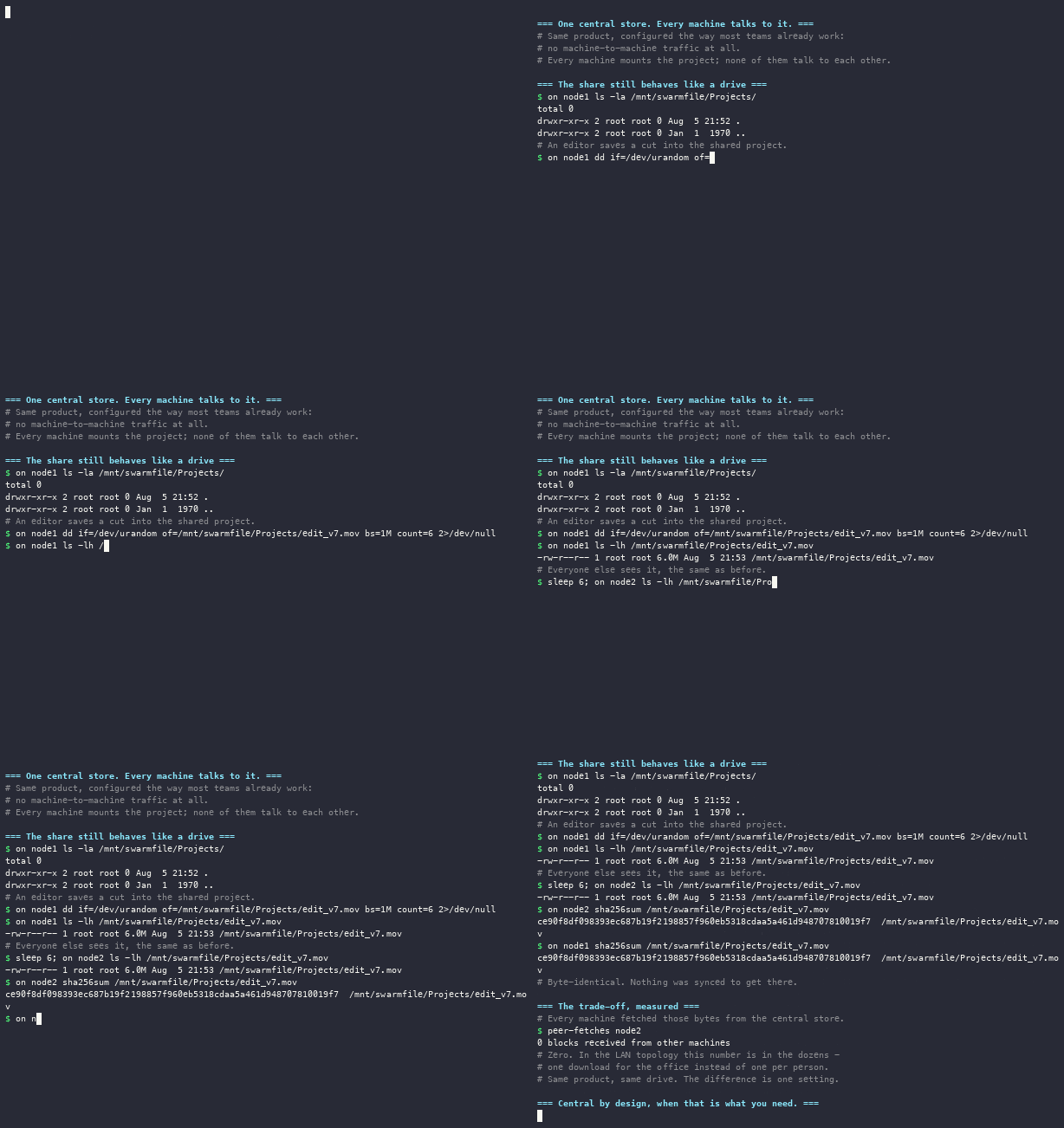
Choose this when machine-to-machine traffic on the corporate network is disallowed, when your sites have no meaningful local network between them, or simply because it is the model everyone already understands. It works, and the drive behaves identically.
The cost is at the end of that recording: zero blocks received from other machines. Ten editors opening the same 200 GB sequence means ten downloads of it.
LAN-first: one download per office#
The same project, with machines allowed to serve each other.
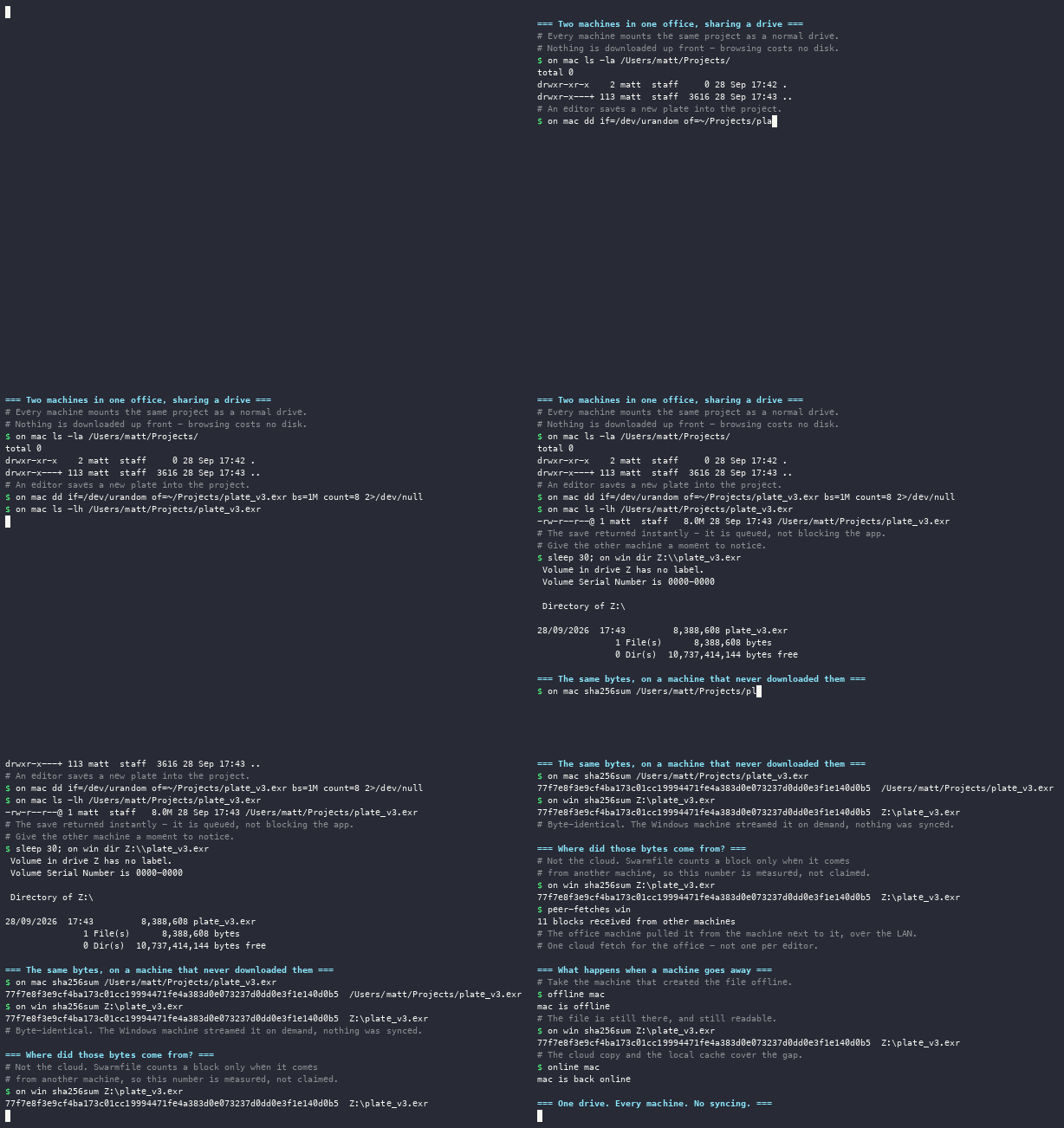
The first person to open a file pulls it from the cloud. Everyone else in that office gets it from them, over the local network, at local-network speed. The recording ends with the same counter the central one does - this time in the dozens.
The second half matters just as much: a machine is taken offline and the file is still readable from the others. Erasure coding and peer replication mean the office does not depend on whoever happened to create a file still being at their desk.
LAN-first also applies before a file reaches the cloud at all. When someone asks for part of a file that is still uploading - swarmfile fetch, or a follow job tracking a viewer - the uploading machine hands those blocks straight off its own disk to a peer in the same office, rather than everyone waiting for them to climb the office uplink and come back down from storage. That needs the project's blocks to be peer-servable (an encrypted project, or a public one); blocks that don't qualify wait for the cloud. Serving a peer straight off the uploader's disk also only happens on a LAN, deliberately: over the internet it would put every block on the same congested uplink twice, once to the peer and once to the cloud, which is slower for everybody. It is also the reason this workflow is far more comfortable in one building than across two - on a LAN the constraint is the uploader's own disk, not its uplink.
Choose this when several people work in the same building on the same material. It is the default for a reason.
Multiple sites#
A studio with people in two buildings, or two cities, tells each machine which office it is in. Machines then prefer peers in their own office: same-site peers are offered first, then any always-on seed nodes, then whatever else is around.
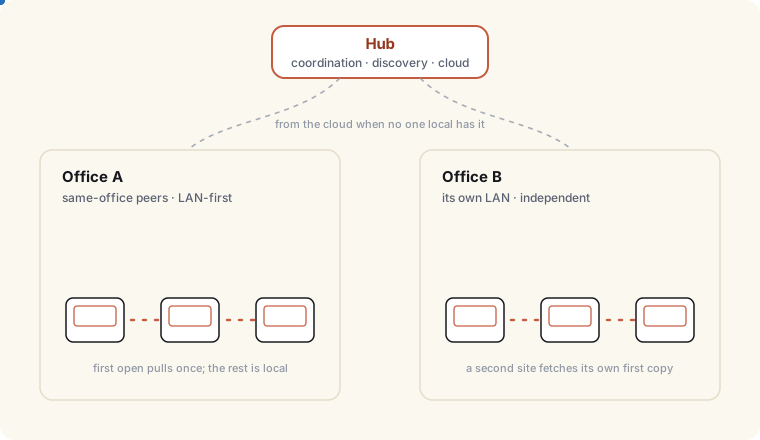
Preference rather than a hard boundary is the useful behavior. A colleague two desks away is the obvious place to get a file from, and that is what happens in practice. But if your site is quiet - one person in early, everyone else still asleep in another timezone - a machine is not forbidden from using a distant peer that happens to be reachable, and it falls back to the cloud when nothing better is available. You get locality where locality exists, without a rule that strands someone working alone.
Nothing about this needs configuring per project. Sites differ; the project, its history and its permissions do not. Add a second person at a quiet site and that site starts sharing locally on its own.
One person, working remotely#
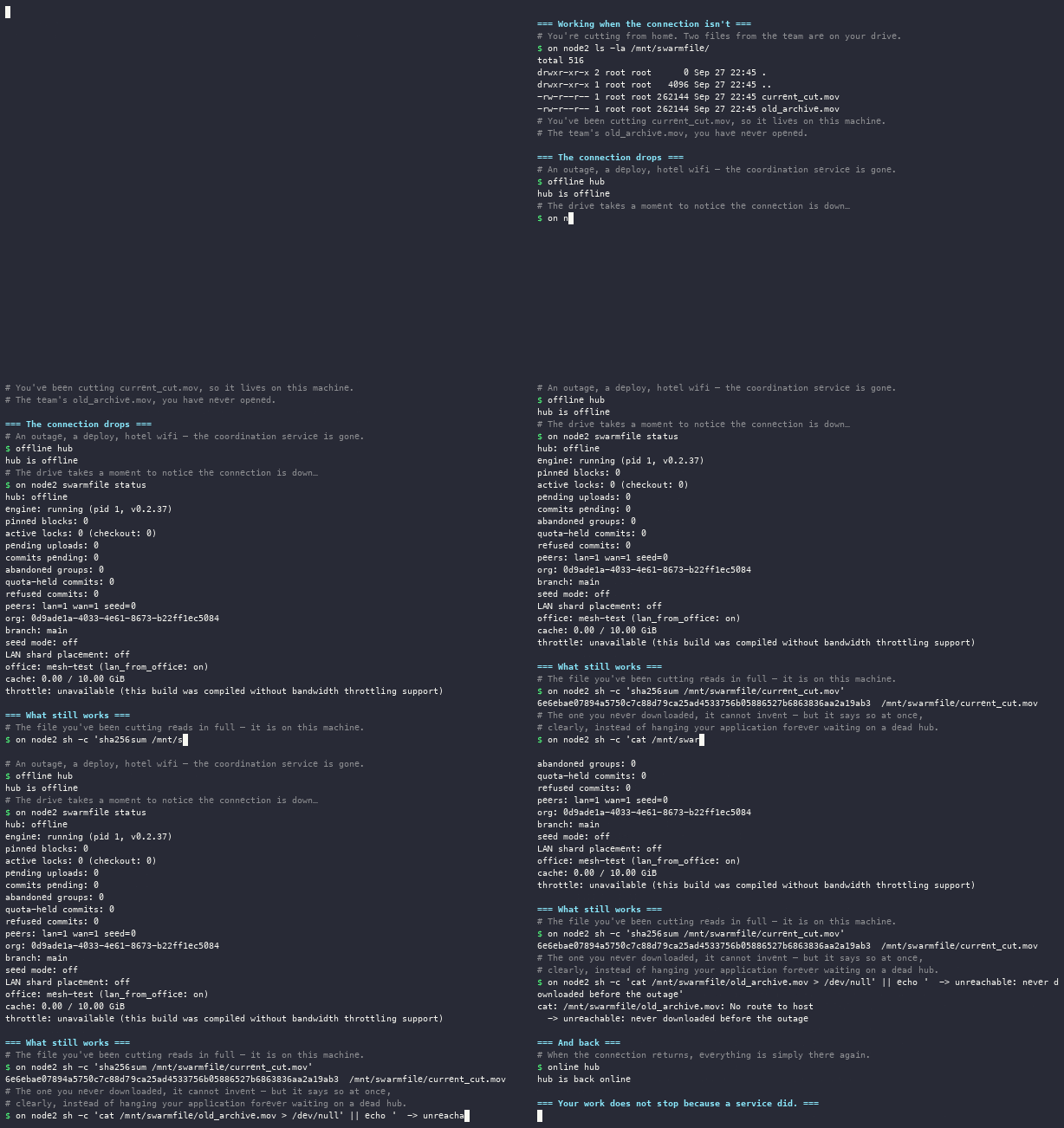
A single editor at home has no peers by definition, and the drive behaves like the central topology above - everything comes from the cloud.
Which raises the obvious question: what happens when the cloud isn't there? A file you've been working with stays fully readable, because it's already on your machine - and a file you never opened fails at once with a clear answer rather than hanging your application, because there's no connection to fetch it over. When the connection returns, everything is simply there again.
One thing does change underneath: erasure coding exists to mask WAN latency, and it switches itself off once a machine can see two or more peers on its local network. A solo remote machine keeps it on and a busy office machine does not, without anyone choosing. If you are evaluating Swarmfile with one person on a home connection, that is the configuration you are testing.
Seeding from what you already have#
Neither topology is any use if getting your existing library in means a weekend of copying.
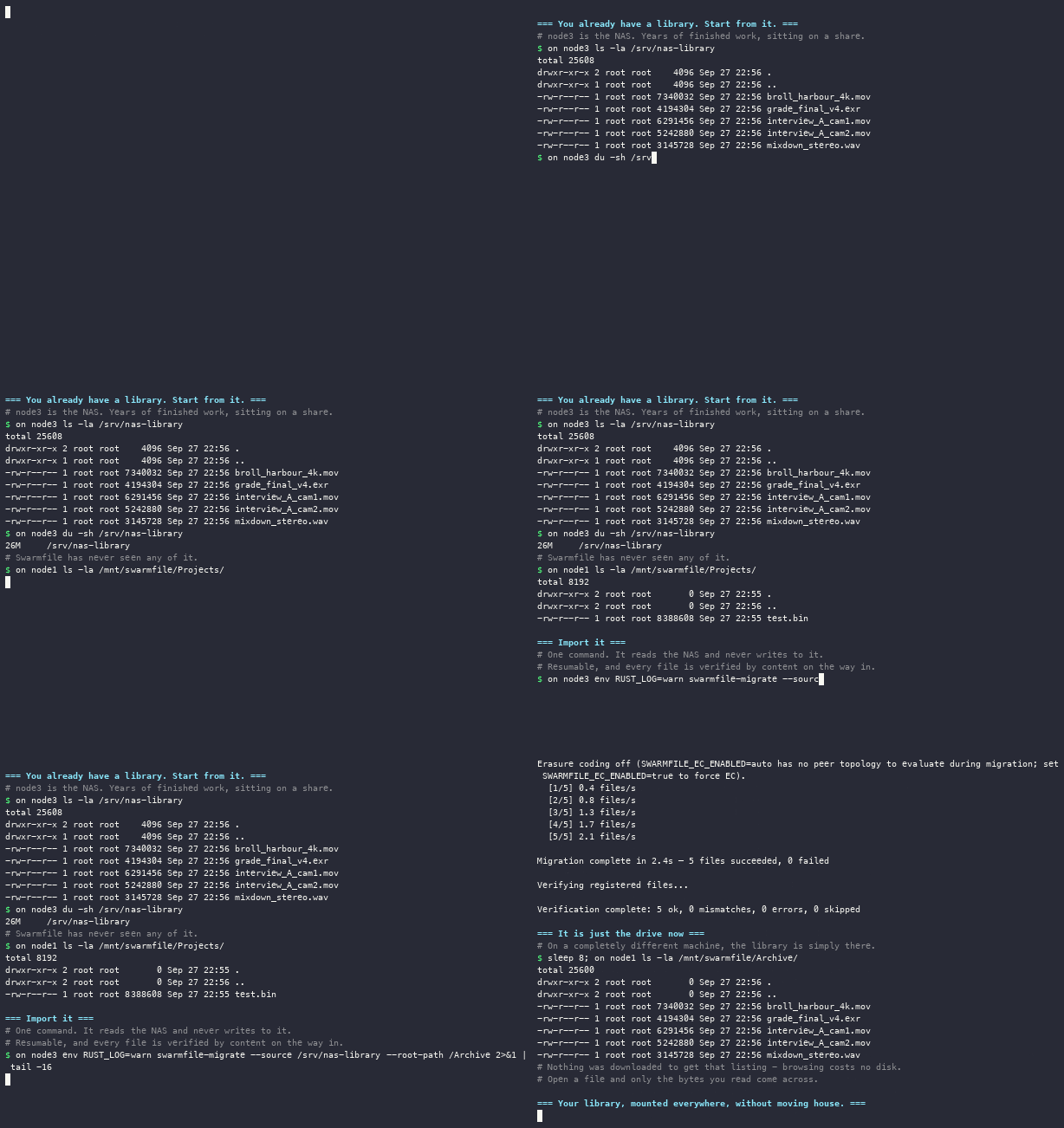
The import reads your NAS and never writes to it, so you can point it at a live share. It is resumable - interrupt it and run it again - and every file is verified by content, not by size and timestamp. Full detail in Migrating Existing Data.
Keeping the NAS as a warm tier#
Importing does not mean retiring the hardware. A machine you own - the NAS, an old workstation, a dedicated box - can join permanently as a seed node: it fetches the whole project, mirrors every block to cloud storage, and keeps a warm local copy of the working set to serve everyone in the office over the LAN.
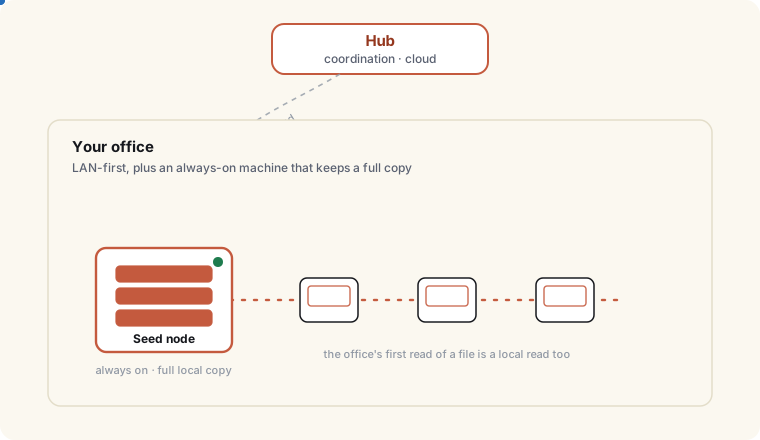
The difference from an ordinary machine is that a seed node is always there. LAN-first already means the first person to open a file supplies everyone else, but that depends on that person being at their desk with the machine awake. A seed node removes the dependency: its cache always holds the recent working set, and older blocks re-fetch on demand (the whole project is mirrored to cloud storage, so nothing is ever unavailable).
Seed nodes are a Pro plan feature. This is enforced rather than advertised - a seed node on a plan without the entitlement is refused by the service, and swarmfile doctor reports it plainly rather than leaving a repeating warning in a log nobody reads. Setup, sizing and hardware guidance is in Self-Hosted Seed Nodes.
The same shape works in a data center rather than an office, for a team with no single main site: an always-on warm tier that belongs to nobody in particular.
Larger offices: deciding where the shards live#
In an office of a handful of machines, whoever opens a file ends up holding it, and that is enough. Past a certain size, leaving your fault tolerance to whoever happened to open what is not a plan.
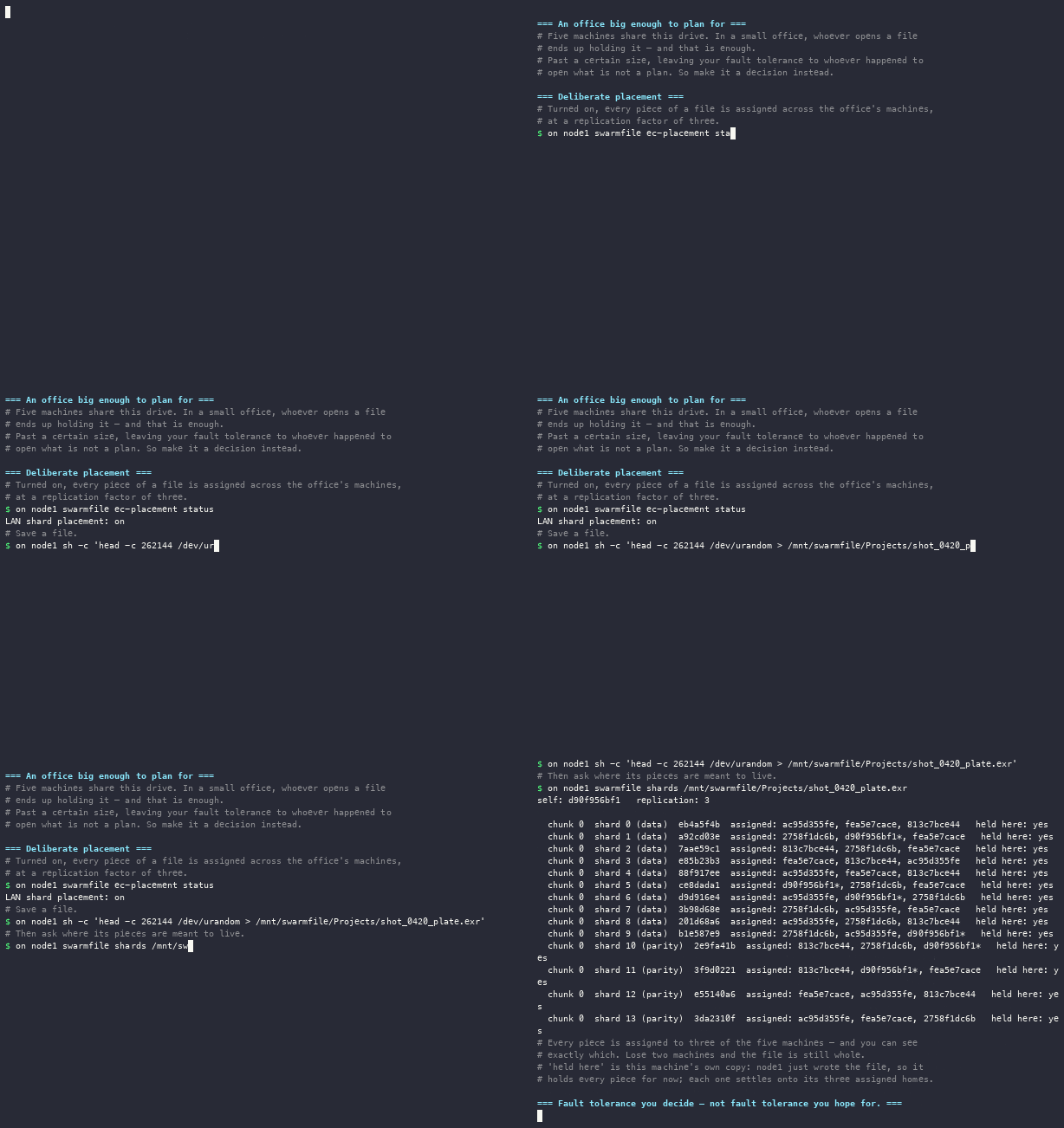
Turning on deliberate shard placement makes it a decision instead: each piece of a file is assigned across the office's machines at a replication factor of three, so any given file survives losing machines rather than surviving because someone happened to have opened it. swarmfile shards <path> shows the live assignment for any file - which machines should hold each piece, and which ones actually do.
Worth turning on when an office is large enough that "who has a copy?" stops being a question you can answer by asking around.
One caveat on corporate networks: deliberate shard placement needs a roster of LAN peers to spread across, and LAN peers are normally discovered by mDNS multicast. On segmented networks where mDNS multicast is blocked, set lan_from_office (SWARMFILE_LAN_FROM_OFFICE, or the config-file key - see Engine Config File) so same-office peers count as LAN. Both the office_id label and this flag apply live via swarmfile office set <office_id> [--lan-from-office] within one peer-discovery tick (~60s, no restart) - unlike enabling shard placement itself, which needs a restart.
Mixed Windows and macOS offices#
A normal post or design floor is not one platform, and Swarmfile does not ask it to be. Windows machines mount through WinFsp and get a drive letter; macOS mounts through FUSE and gets a volume. Both are ordinary local paths to the applications on top, both are peers to each other, and a file written on one is a file on the other.
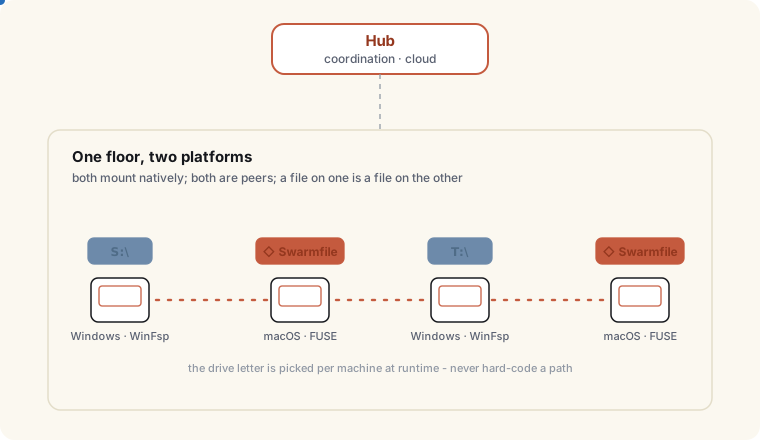
One practical consequence worth knowing up front: the drive's location is decided per machine, at runtime. On Windows, a taken drive letter is only silently relocated to a free one when it was never an explicit choice - still sitting on the app's own default or a letter it auto-picked - and a free candidate actually exists. If you (or a script) explicitly set the letter, Swarmfile honors that choice and reports the conflict by naming the occupant instead of quietly moving you off it; likewise if every candidate letter is also taken, the mount fails and names the occupant rather than relocating. So no script, template or onboarding document should hard-code a path - read it from the Desktop App's Status pill, or from the app, which knows.
Render farms and headless machines#
Not every machine that needs the project has somebody sitting at it. Render nodes, watch folders, transcode boxes and QC stations are usually many readers and few writers, which is the shape LAN-first is best at: the first node to pull a frame sequence supplies the rest of the farm locally instead of every node fetching it independently.
Two things make this work well in practice. Mount the farm read-only where it only needs to read, so an automation cannot write into the project by accident. And give the farm a seed node - a machine that keeps the project warm and mirrored - so the first read of the day is a local read too, rather than depending on whichever workstation happens to be awake.
If the farm itself is cloud-hosted - a cluster of render nodes in your own cloud account rather than machines in a physical office - there's no single LAN to put that one seed node on. The farm can still get redundancy among its own nodes instead of leaning on a single point of failure: enable seeding and set the same office_id on each node (no shared network required - see Self-Hosted Seed Nodes). Each seed node independently fetches every block and mirrors the full project to cloud storage, so the project's cloud copy is complete on its own - a stronger guarantee than deliberate shard placement's replication factor of 3 - and there's no extra step needed on top of it for an all-seed-node farm.
The other thing an unattended machine usually needs is to be pinned to an exact version, not "whatever main happens to be right now" - a render should use the frames as they were when the job was submitted, even if someone pushes a fix five minutes later. Tag the commit a job was submitted against, then have each node branch from that tag: one command, no Desktop App or browser interaction, and the node's copy is frozen to precisely that content regardless of what lands on main afterward.
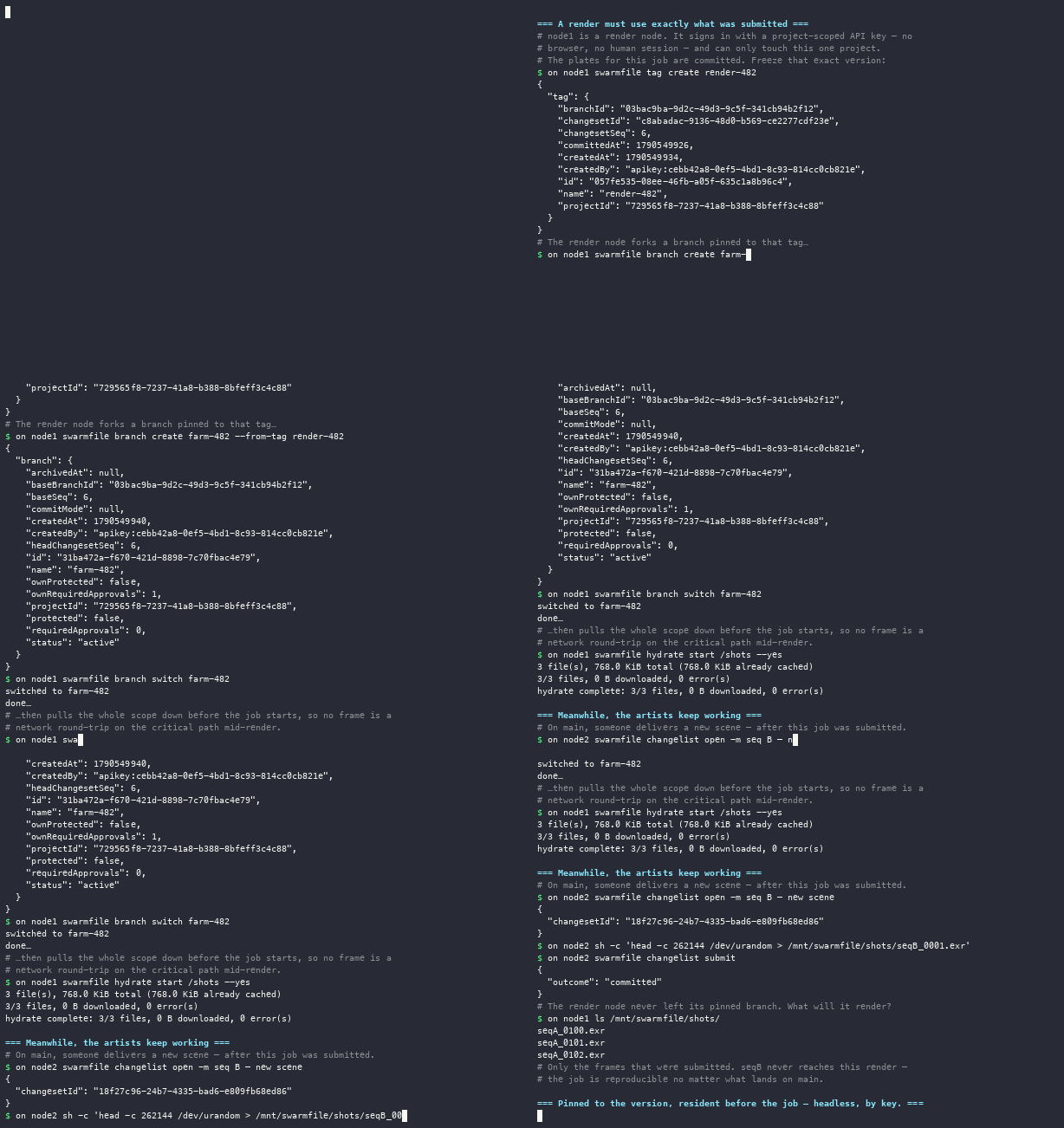
swarmfile commit -m "submit render job 482"
swarmfile tag create render-482
swarmfile branch create farm-482 --from-tag render-482
swarmfile branch switch farm-482
tag create with no --at-seq tags the branch's current head - exactly the commit the submission script just made, with no separate step to look up its commit number.
Mounting sparse is right for interactive work, but a render node has no interactivity to hide latency behind: the first frame it opens still has to fetch before the job can proceed, and if that node has no LAN peer or seed node nearby, every frame is a cloud round trip on the critical path. swarmfile hydrate start forces a scope fully resident up front instead - download and pin every file under a path (or the whole project as this mount's branch sees it) before the job starts, rather than fetching lazily as frames are opened:
swarmfile hydrate start ./Projects/shots/seqA --yes
Hydrated files are pinned against the cache's normal eviction, so they stay resident until you explicitly swarmfile hydrate release them (or delete the local copies outright with swarmfile hydrate free-space once the job is done) - useful for a node that needs to keep working with no network at all for the length of a job. Pair it with the branch-from-tag pin above: hydrate the exact scope a job was submitted against, and the node has everything it needs, locally, before a single frame renders.
A farm node authenticates with a project-scoped API key, not a human session. Mint one from the web dashboard, the Desktop App, or the CLI - an admin or owner picks a name and a single project, and gets back a secret shown exactly once:
swarmfile api-key create farm-node-12 --project proj_9f2a
Set it as SWARMFILE_API_KEY on the node (alongside SWARMFILE_CONFIG pointing at a per-project config file) and the engine skips sign-in entirely - no browser, no refresh token, no impersonating whoever happened to mint it. The key is walled off to that one project: it can't read or write anything else in the org, even projects the admin who minted it can see, and revoking it (swarmfile api-key revoke <id>, or from the dashboard/Desktop App) kills that one node immediately without touching anyone's own session. See CLI: swarmfile for the full branch/tag/hydrate/api-key reference.
For the coding-agent variant of this shape - several agents, each with its own labeled mount and branch, sharing one dependency cache - see Coding Agents.
What runs where - and what you can host yourself#
Worth being direct about, because it comes up in every security review.
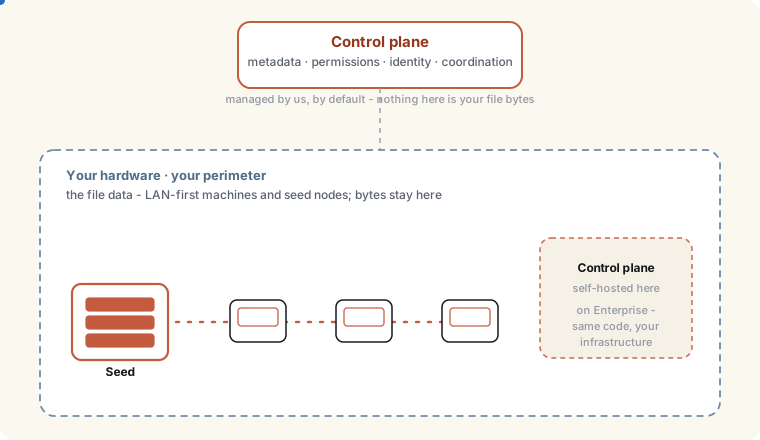
On your hardware: the file data. Dedicated storage is the default for new paid orgs - an isolated bucket of their own rather than a shared one - and on Enterprise bring-your-own-storage can make an S3-compatible bucket on your own account the org's primary block storage. Seed nodes keep the project warm locally (their cache budget bounds the disk; every block is mirrored to your storage), and LAN-first means bytes move machine-to-machine without a round trip to anyone's cloud. A studio with a seed node in the building serves most reads from its own hardware.
Where it lives: every paid plan can pin an organization's metadata and block storage to a real EU or US jurisdiction at signup, at no extra cost (Free uses shared storage and isn't eligible), and an individual project can carry its own residency pin independent of the org's. Enterprise can additionally provision FedRAMP / FedRAMP-High storage regions through sales (storage only - Swarmfile is not FedRAMP-authorized).
Managed by us, by default: the control plane - metadata, permissions, identity, and the coordination that lets machines find each other. Most customers run this as a hosted service.
Self-hostable on Enterprise: the control plane can also run entirely on infrastructure you control, on a self-hostable runtime compatible with the platform it's built on - the same code, not a fork or a lesser rewrite. This is available on Enterprise today; talk to us about what it would involve for your environment. A fully air-gapped deployment, with no outside connectivity at all, is not available today.
So Swarmfile suits an organization that wants its bulk data on infrastructure it controls, even on the standard hosted plan - and if you need the coordination layer inside your own perimeter too, that's an Enterprise option rather than something the rest of this page's topologies can get you. Raise it early in a procurement conversation so it gets scoped correctly.
Encryption is the thing worth reading next if this section is what you came for: per-project keys, with an end-to-end tier where the service cannot read your content at all. See Security.
Guests, clients and consultants#
Not everyone who needs a file needs a machine in your topology. External collaborators get a named, revocable read - or read-and-comment - view of one folder, with no paid seat and a full audit trail - a colorist, a client reviewing a cut, a consulting engineer. Covered in Sharing & Collaboration.
Choosing#
| If this is true | Use |
|---|---|
| Machine-to-machine traffic is not permitted on your network | Central, enforced org-wide |
| Your people are spread across homes and cities, rarely co-located | Central |
| Several people share a building and open the same large files | LAN-first |
| You have multiple offices | LAN-first at each; they are independent |
| You have an existing NAS you want to keep using | LAN-first plus a seed node (Pro) |
| Nobody has a main office, but you want a warm copy somewhere | A seed node in a datacenter (Pro) |
| An office is big enough that "who has a copy?" is unanswerable | LAN-first plus deliberate shard placement |
| Someone outside the company needs to see one folder | An external collaborator, not a topology change |
| Your floor is a mix of Windows and macOS | Either topology; both mount natively |
| Many machines read, few write (a render farm) | LAN-first, mounted read-only, plus a seed node |
| Everything including the control plane must be inside your perimeter | Enterprise self-hosted control plane (fully air-gapped is not available today) - see "What runs where" above |
Switching is a setting, not a migration: the files, history, and permissions are unaffected. Try one, measure it, change your mind.
Two things worth knowing about who holds that setting. Each machine can choose for itself - but an organization can also set its data-plane policy to hub-only for everyone, and that decision overrides the local setting on every machine, whatever it is set to. If your security position is "no machine-to-machine traffic on our network", that is enforceable centrally rather than left to each person to configure correctly.
The reverse is not true: an org that permits LAN-first does not compel it. A machine on a network where peer traffic is blocked simply finds no peers and falls back to the cloud, which is the central topology arriving at itself.